
Platform features
GeminIQ Platform Features: Institutional-Grade Fundamental Analysis Tools
Most financial research platforms rely on third-party data providers that simplify, alter, or delay crucial information. GeminIQ removes the middleman, delivering raw, unadulterated SEC data directly to your screen — organized around a single company snapshot, a dedicated peer-comparison workspace, and a watchlist built for tracking live theses rather than just tickers. Explore the core features designed to help you research faster, invest smarter, and uncover the fundamental truth behind the ticker.
Research overview | Above the fold
Company Snapshot: Every Signal, One Screen
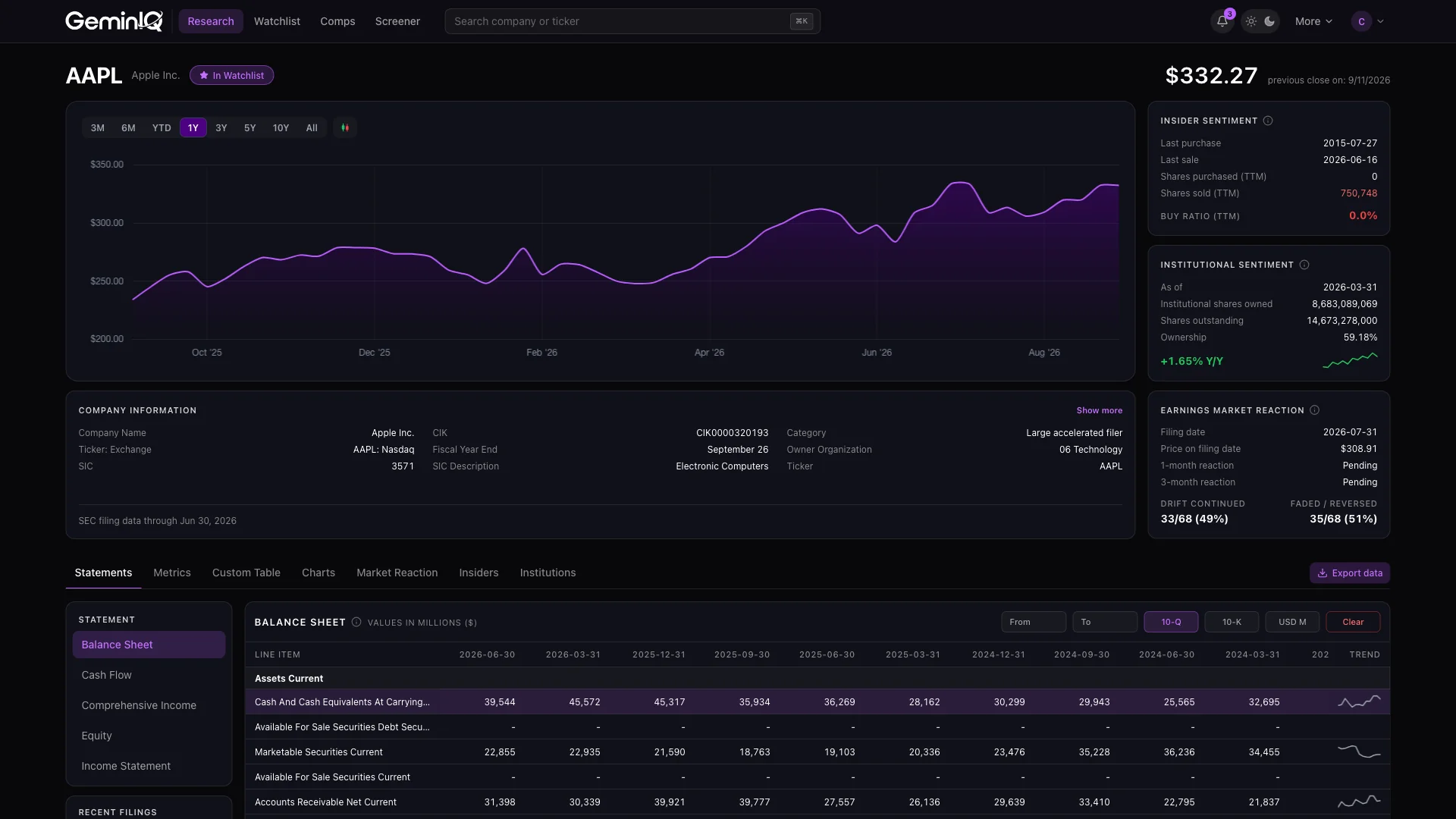
Research used to mean hunting across five tabs just to answer "is this worth a closer look?" The Research overview puts the whole investment case above the fold — a stock price chart, the last insider purchase and sale with a calculated Buy Ratio showing insider buying vs. selling, institutional shares owned and year-over-year change with a trend sparkline, and the company’s own post-filing drift history.
SEC EDGAR | 10-K & 10-Q as filed
Direct-from-Source SEC Financial Statements
View 10-Q (quarterly) and 10-K (annual) data exactly as the company filed it, pulled straight from SEC EDGAR with no third-party data provider in between. Company-specific disclosures and management’s own labels survive intact, and every figure carries its XBRL tag so you can verify it against the source document in seconds.
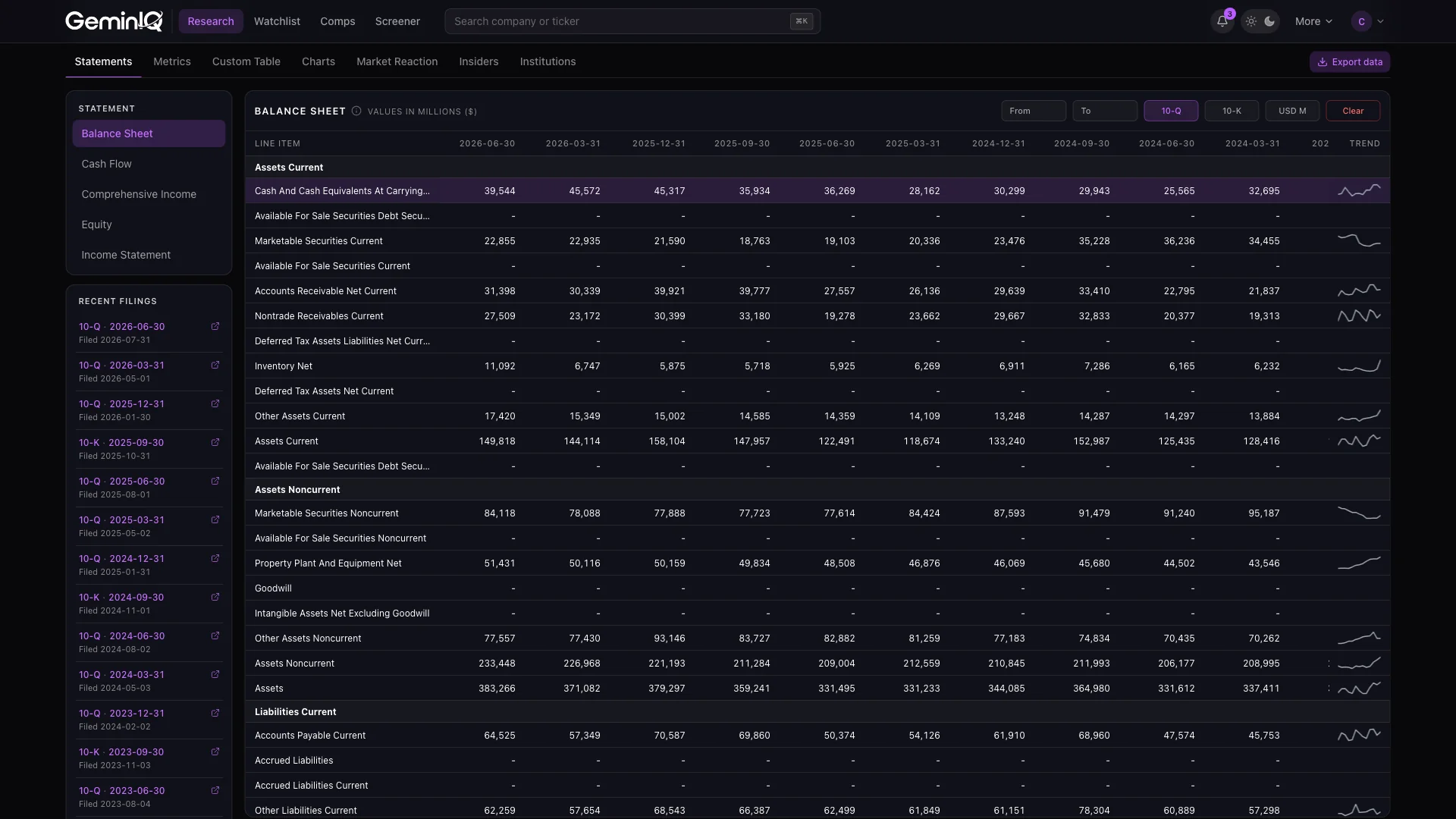
Switch between Balance Sheet, Income Statement, Cash Flow, Equity and Comprehensive Income views, toggle the table between millions and as-filed units, and click any row to chart that line item’s full history. A sparkline on every row shows its trajectory across the visible periods, and the company’s recent filings sit beside the table as direct links back to EDGAR. Filings are processed overnight, so clean data is ready by the time the market opens — with 17+ years of history on every paid plan.
See how direct sourcing prevents data discrepancies: What Third-Party Financial Data APIs Miss — And Why It Costs You (2026).
Line items + 90+ metrics
Customizable Data Tables
Cut through the noise and focus only on the metrics that matter to you. One catalog spans every as-filed line item — down to granular disclosures like Deferred Tax Assets — and all 90+ calculated metrics, so a single table can put Inventory Turnover directly beside the raw Inventory balance it came from.
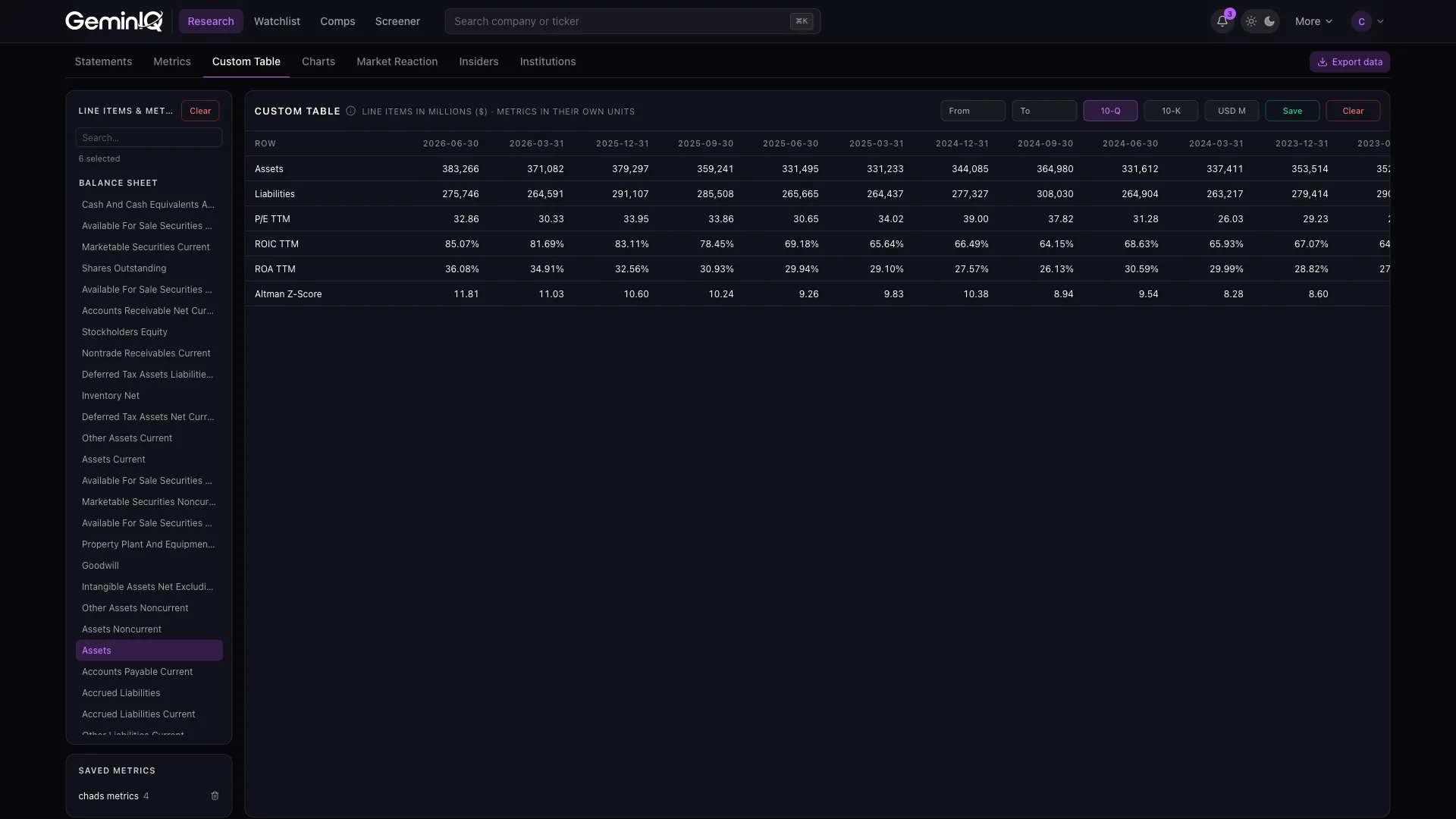
Switch between quarterly and annual filings, filter by date range, and save your favorite metric sets to reuse instantly across any company. Every selection feeds straight into the Charts tab, so a layout saved in either one loads in the other.
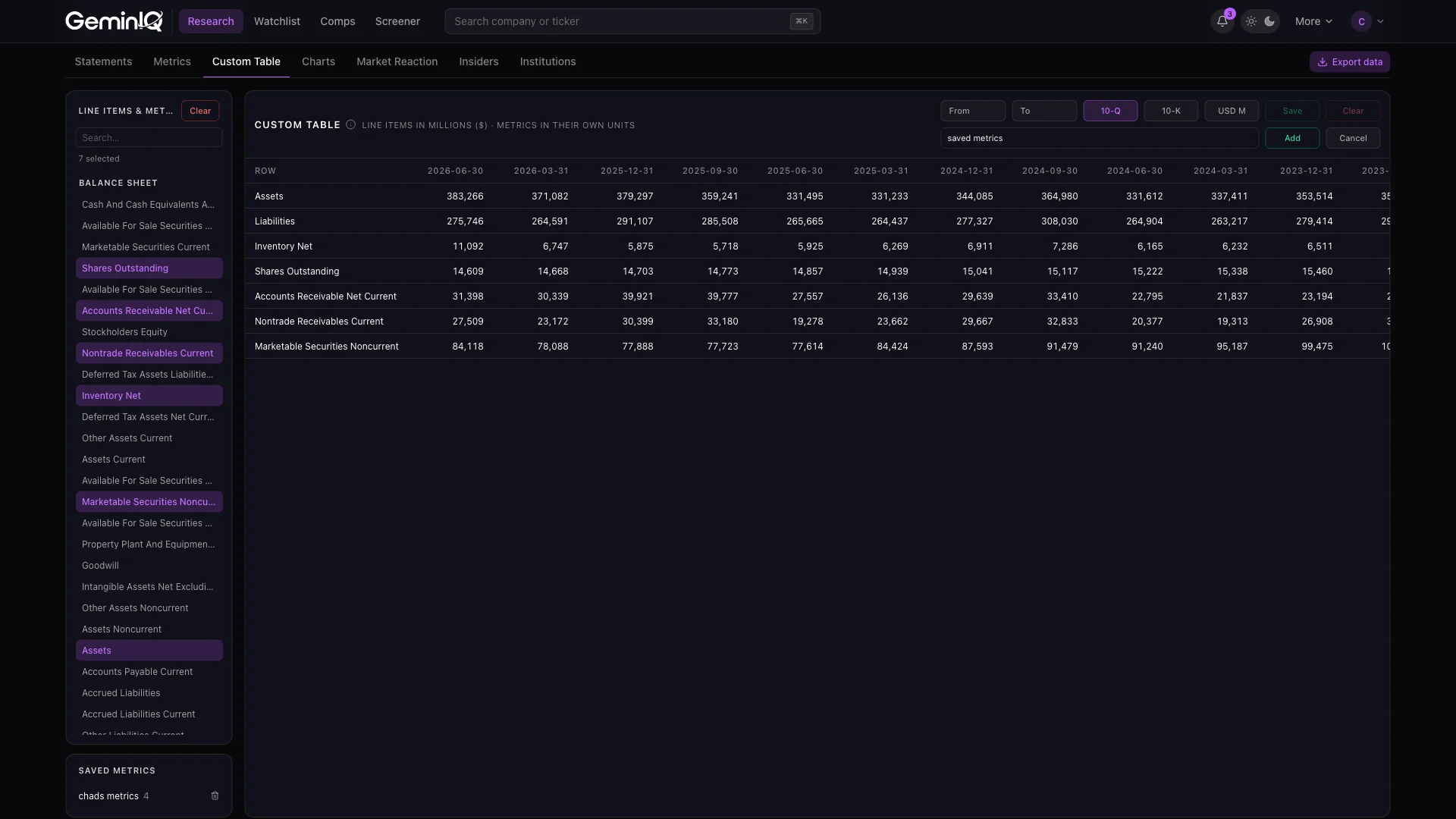
See the Custom Table used to audit NVIDIA’s inventory efficiency: NVIDIA ($NVDA): The $120 Billion Cash Machine No One Is Auditing.
Price overlay | 5 transformations
Interactive Financial Visualizations
Turn raw financial data into clear, customizable charts that reveal the story behind the numbers. Choose the metrics that matter — revenue, margins, debt, cash flow — and set line, bar or area independently per series, so a stacked balance-sheet bar can sit under a margin line without either becoming unreadable.
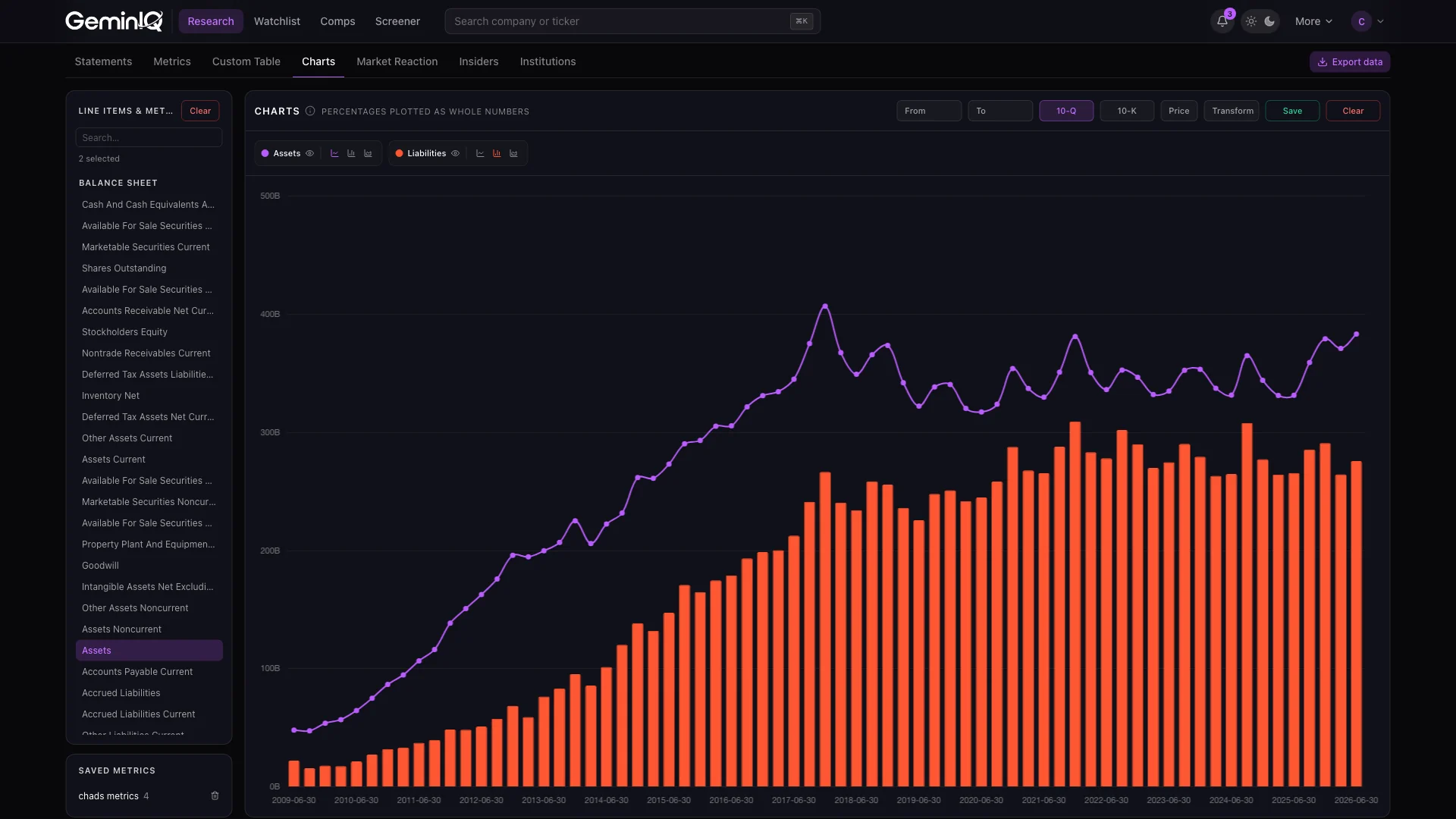
Filter to specific periods, overlay the actual share price on a secondary axis to see whether the market followed the fundamentals, and apply one of five transformations — Z-Score, Min-Max, Log, Index or Abs — to put metrics of wildly different scales on the same axis. Save your favorite metric sets to reuse across companies, making your research faster and more repeatable.
See how 13 years of Coca-Cola data becomes a clear narrative in one chart: The Coca-Cola Company ($KO): The 13-Year ‘Zero Growth’ Illusion.
Post-earnings drift
Earnings Market Reaction Heat Map (Price Variance)
For each filing we track the stock’s price performance over 1, 2 and 3 months for 10-Qs, and 1 through 12 months for 10-Ks. Quickly gauge how investors historically reacted to new financial information — whether the market rewarded strong results or punished weak ones — and spot patterns in what academics call post-earnings-announcement drift.
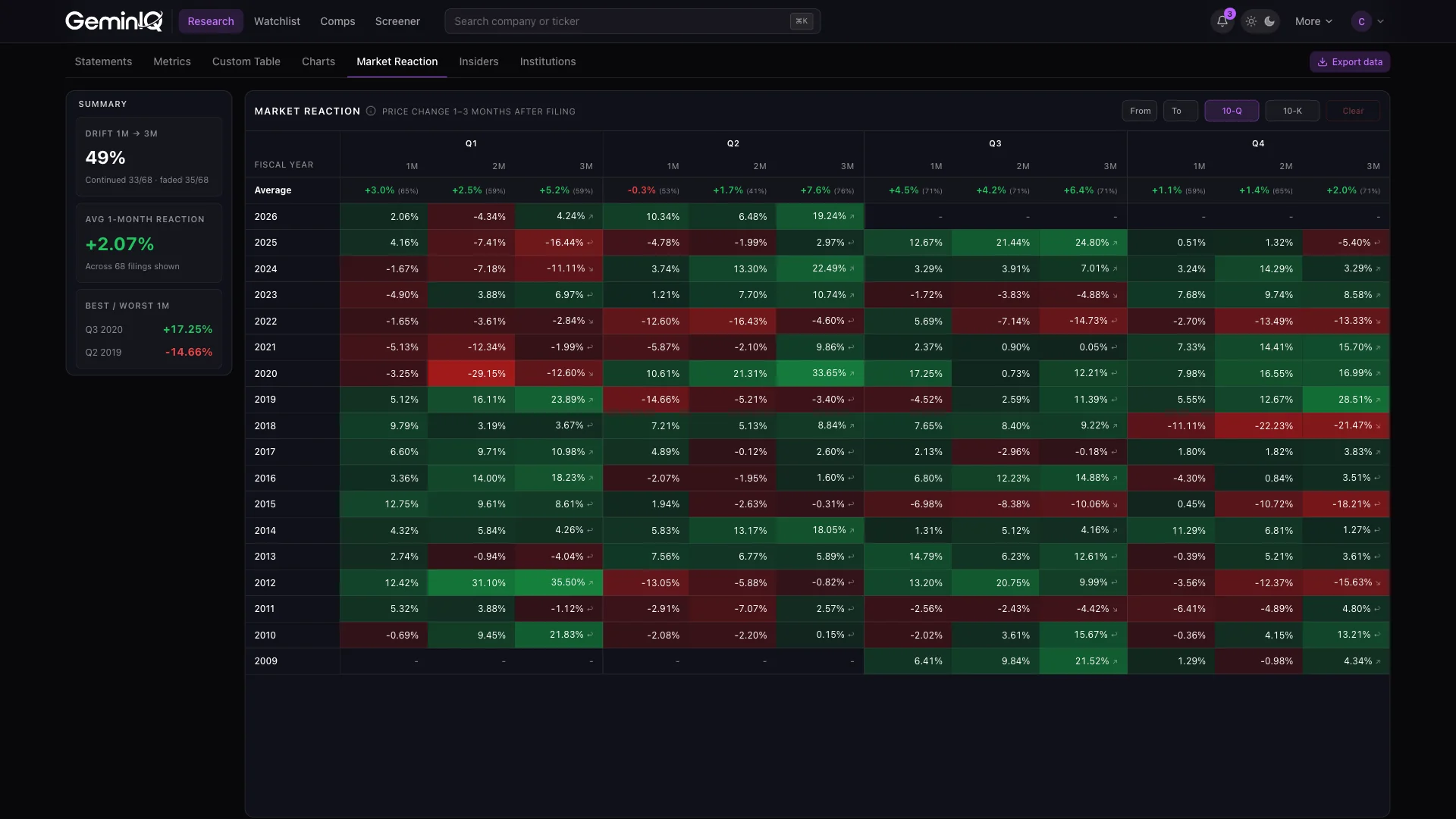
A summary rail alongside the grid reduces that history to three numbers: how often the 3-month move continued in the same direction as the 1-month move versus faded or reversed, the average 1-month reaction across every filing in range, and the single best and worst quarters on record.
See the Heat Map used to time a NVIDIA filing entry: NVIDIA ($NVDA): The $120 Billion Cash Machine No One Is Auditing.
90+ ratios | Traceable to source
Comprehensive Calculated Metrics
Make apples-to-apples comparisons with 90+ industry-standard metrics, calculated directly from SEC filings with full traceability to source data. You get a complete view across profitability, efficiency, growth, liquidity, leverage, returns and valuation — ROIC and the full Altman Z-Score computed and recomputed with every new filing, alongside EV/EBITDA, Free Cash Flow Yield, Cash Conversion Cycle, and 3- and 5-year revenue and EPS growth.
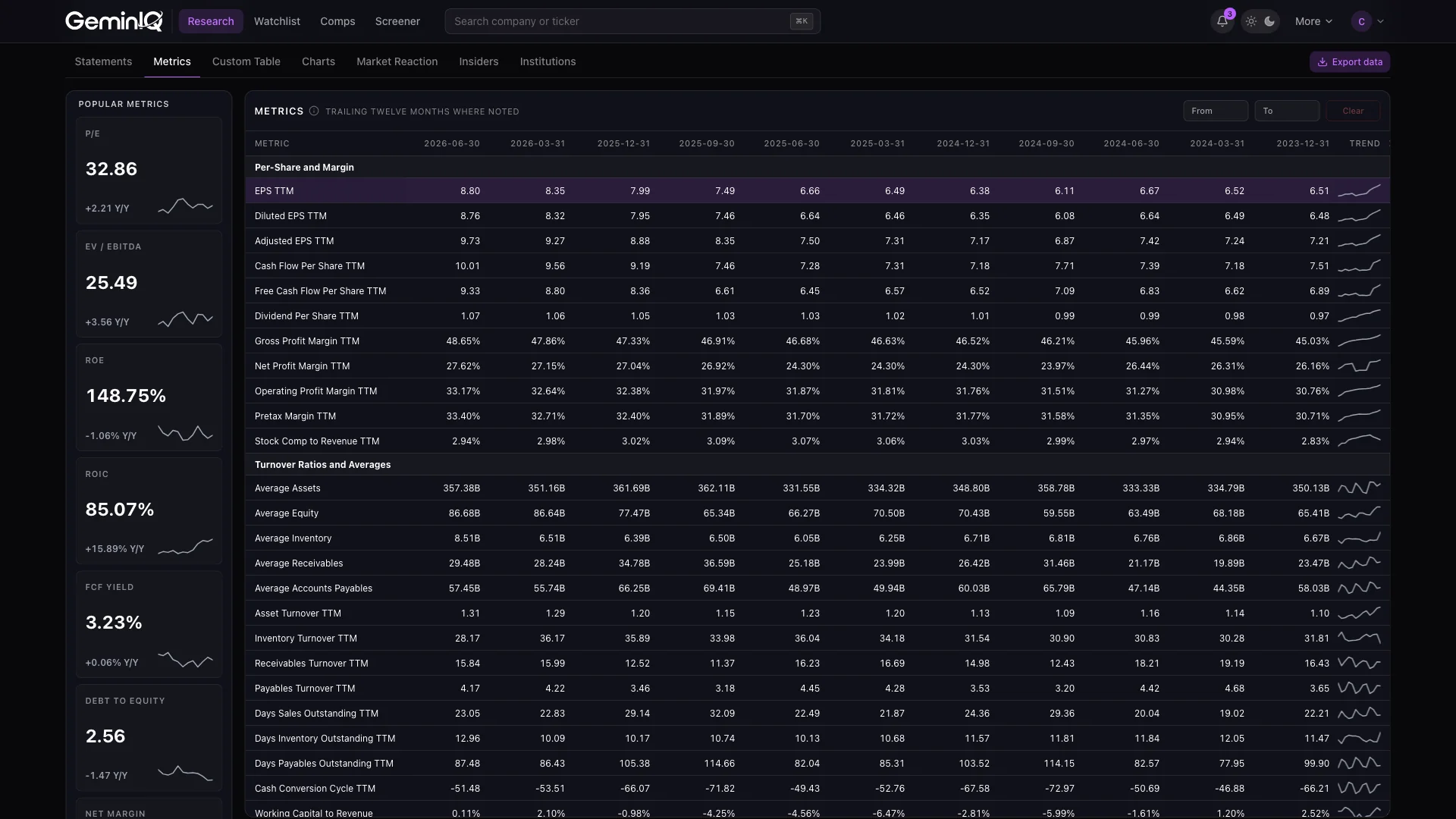
Popular metrics surface as summary cards with year-over-year change and a sparkline, and the full table is grouped by category with every row clickable to expand into its own chart. Whether you’re screening for high-margin businesses, comparing ROE across peers, or spotting accelerating growth, the metrics are ready without the manual cleanup.
See 7 calculated metrics used to rank three retailers that look identical on the surface: The GeminIQ Intel Brief: The Retail Sector’s Inventory Trap and the ROIC Mirage.
SEC Form 4
Insider Transactions Tracker
See what company insiders are doing with their own money. GeminIQ is an insider trading tracker built directly on SEC Form 4 filings, turning raw filings into a visual timeline of purchases and sales by executives, directors and major shareholders — green bars for open-market buying, red for selling.
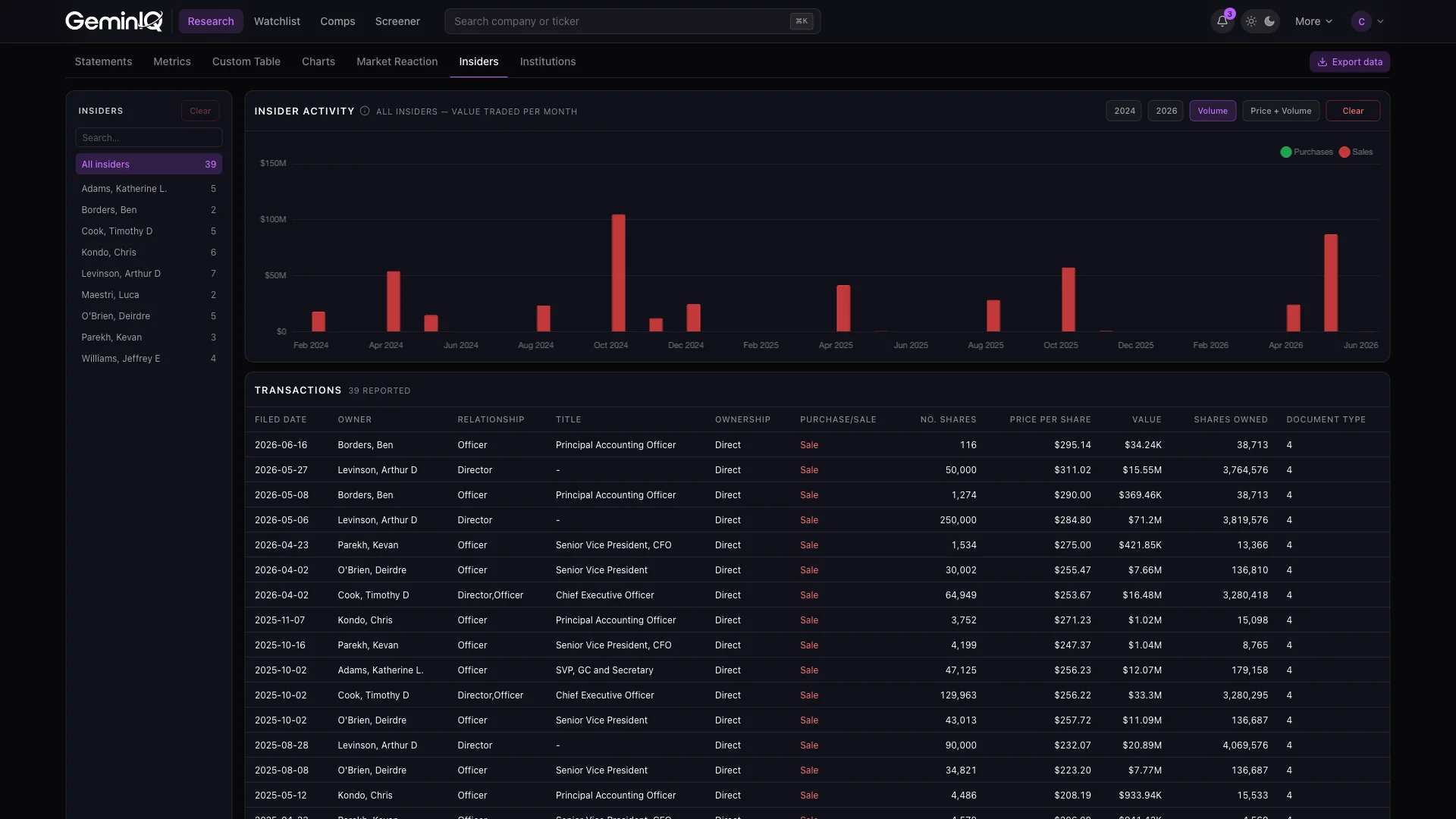
Switch to the Price + Transactions view to see every trade plotted on the stock’s price chart, with full filing detail below: owner, relationship, title, share count and price per share. Filter down to a single insider when one executive’s pattern is telling a different story than the aggregate. Whether you’re validating a thesis or spotting red flags, insider buying adds valuable context to your fundamental analysis.
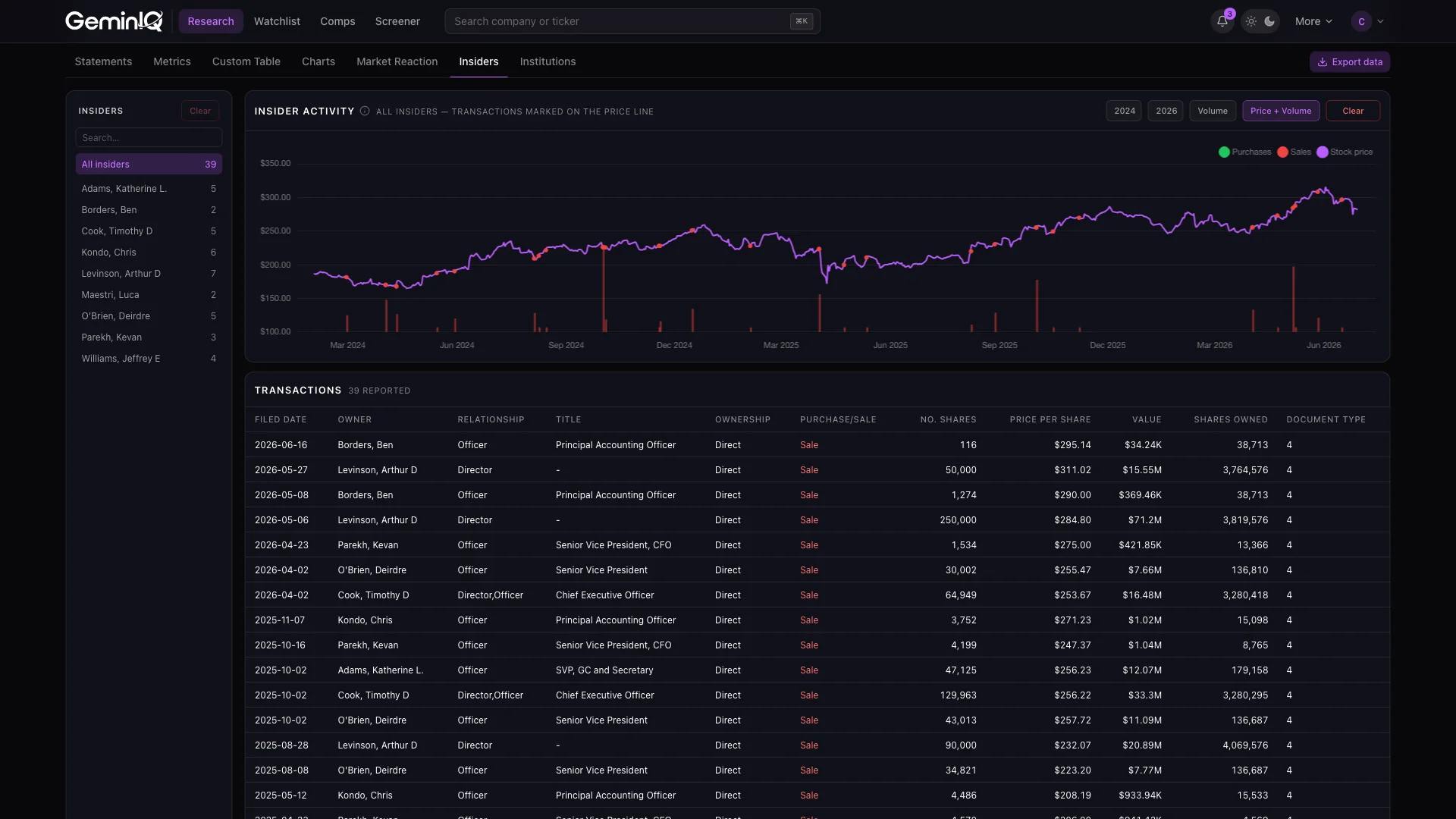
See how insider data reveals 5 years of conviction buying the headlines missed: GameStop Corp. ($GME): The $9 Billion SPAC, the Textile Mill, and the ‘Next Warren Buffett’.
Quarterly 13F filings
Institutional Ownership Monitoring
Measure institutional participation at a high level. GeminIQ’s institutional ownership tracker monitors aggregate ownership percentages using institutional ownership data taken straight from quarterly 13F filings, so you can see how much professional capital sits in a company and how that exposure evolves over time.
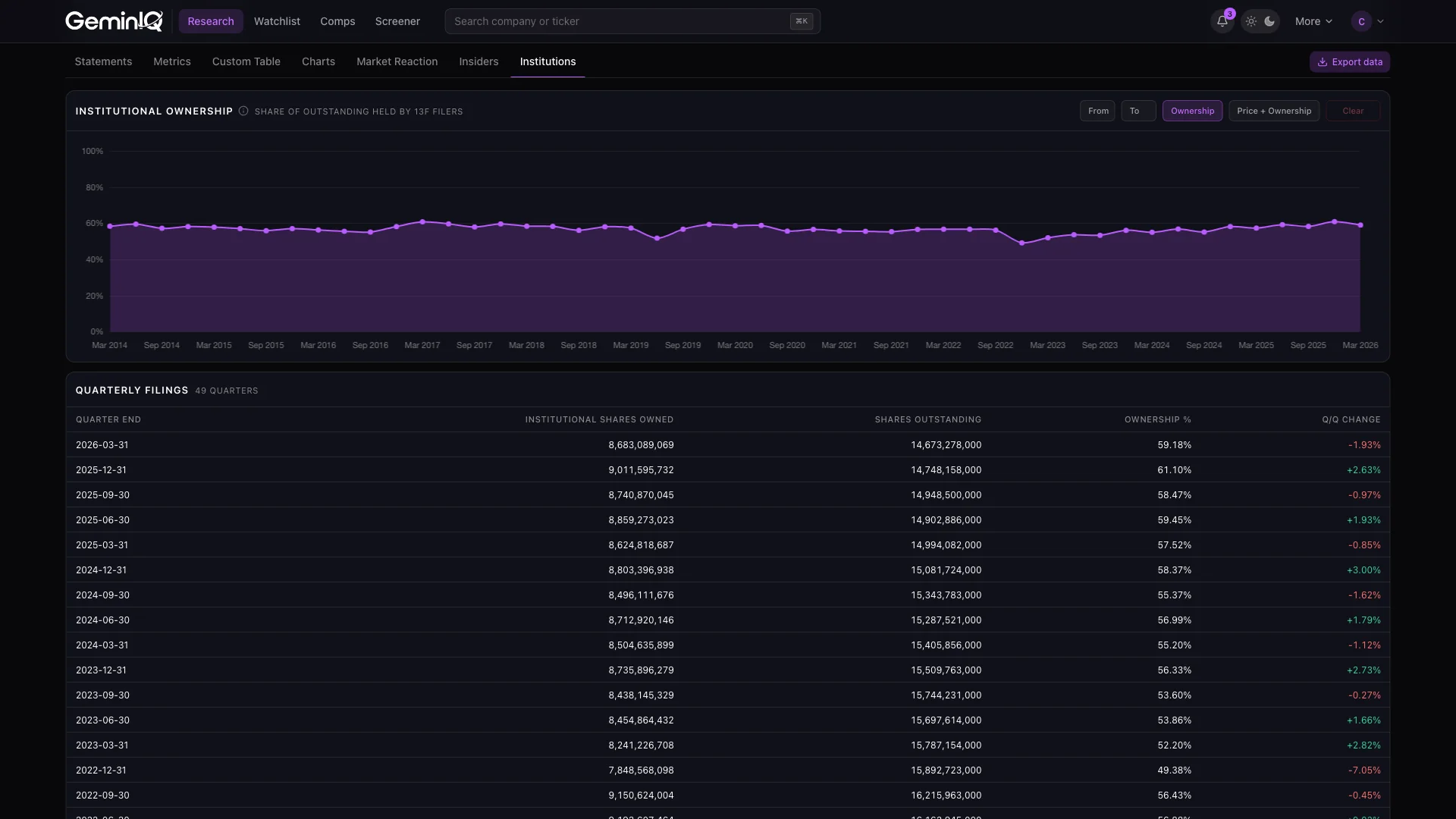
Toggle to the Price + Ownership view to see exactly where institutional buying and selling clustered on the price chart — green markers for quarters where ownership increased, red for quarters where it fell — so you can tell whether smart money was accumulating on weakness or distributing into strength.
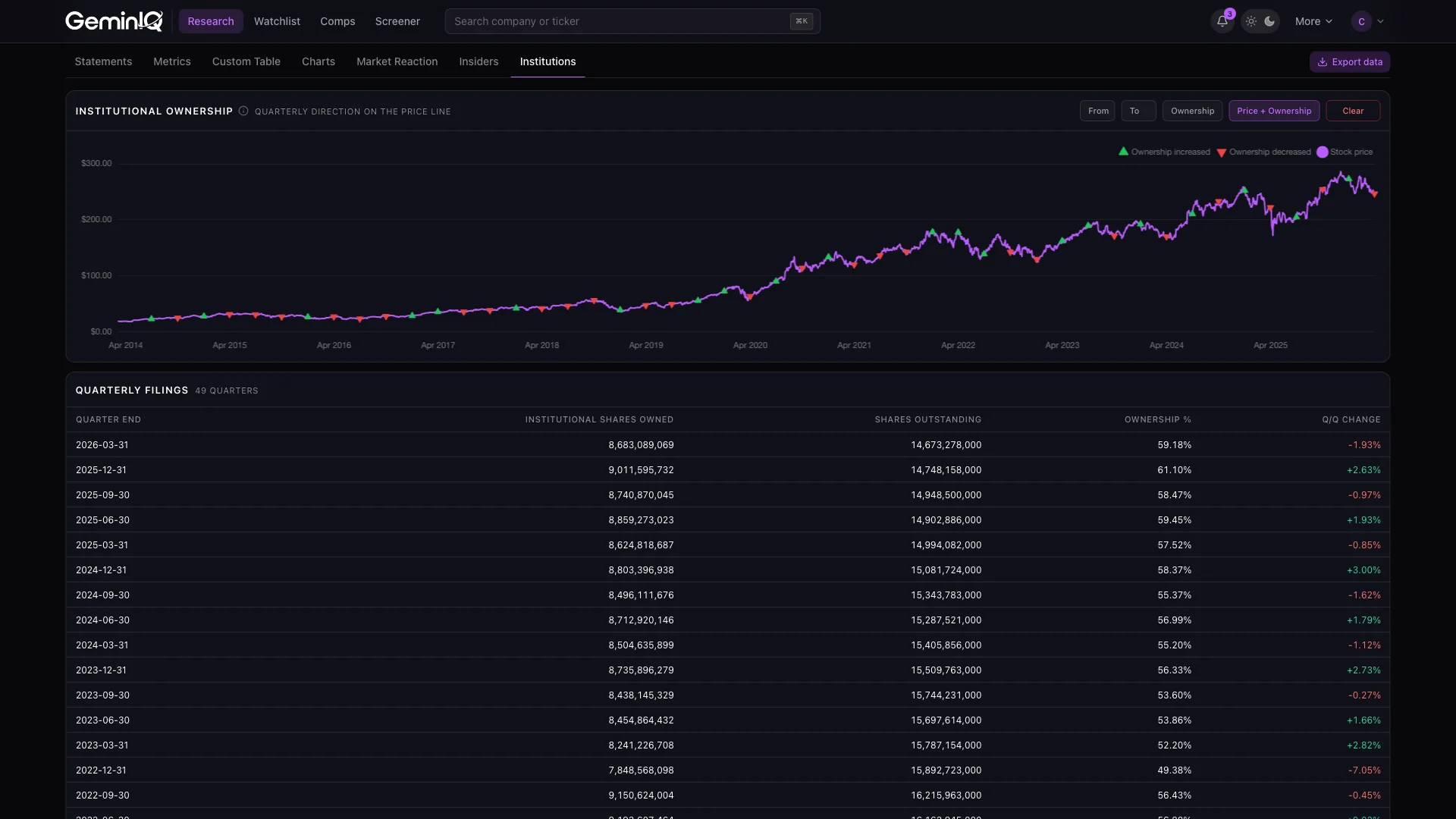
See how institutional positioning correctly ranked three airlines before the headlines did: The GeminIQ Intel Brief: The Airline Sector’s Altman Stress Test.
Excel | One sheet per dataset
One-Click Data Export
Every dataset for a company can leave the platform in a single export instead of being copied out table by table. Toggle Company info, Financial statements, Metrics, Market reaction, Insider transactions and Institutional ownership independently, give each its own date range or apply one range to all, and see the row count each selection will produce before you download.
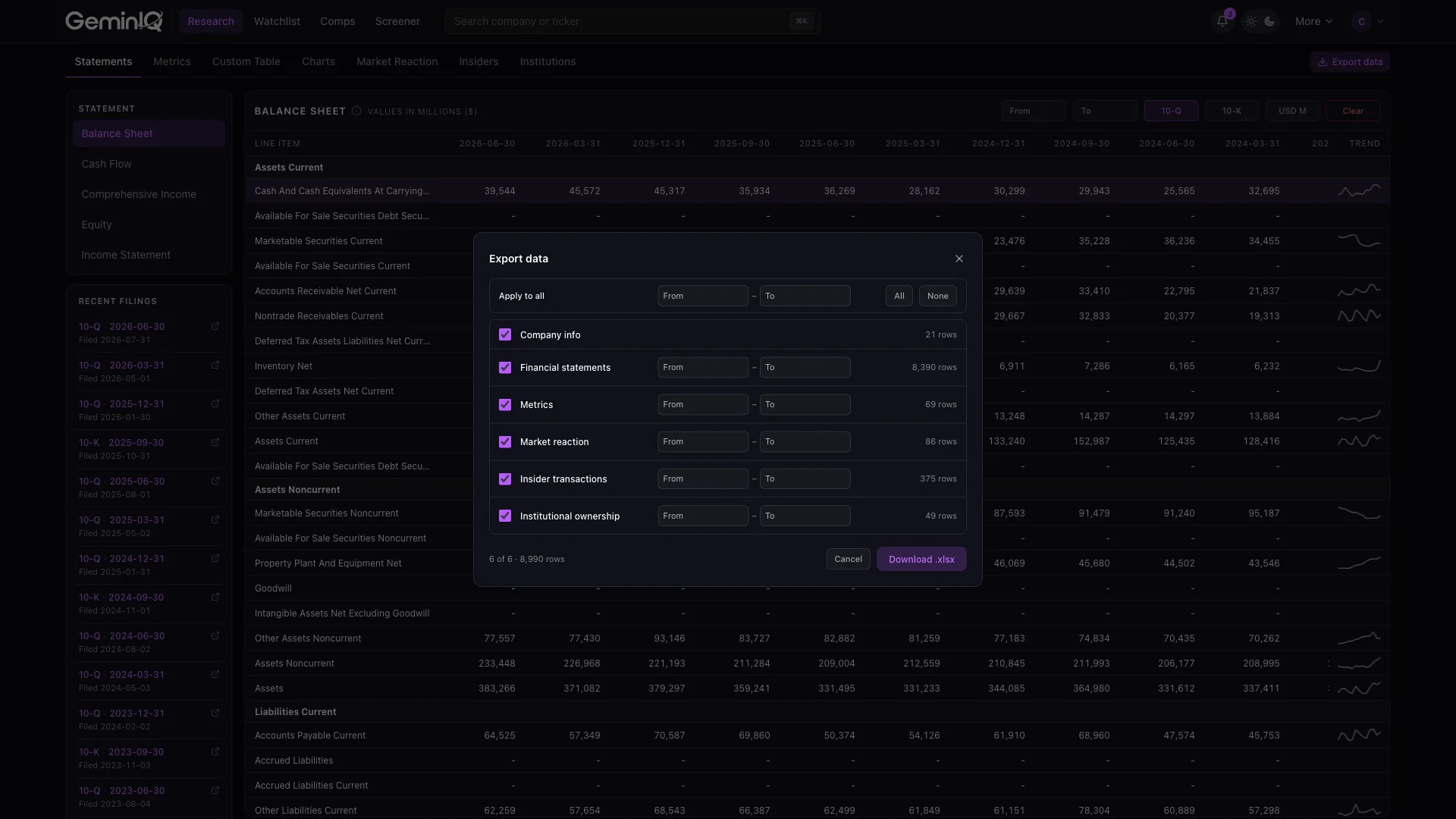
The result is a single .xlsx with one sheet per dataset and actual numeric values in the cells — no formatting layer to strip out and nothing to undo before your own formulas can reference it.
100+ metrics | 18 presets
Stock Screener
Pinpoint exact investment matches using over 100 financial metrics and up to 10 stackable filters. Apply precise logic operators — less than, greater than, between, equal to and more — to build highly targeted searches without relying on restrictive templates, and every result traces directly back to the company's original SEC filing for immediate verification.
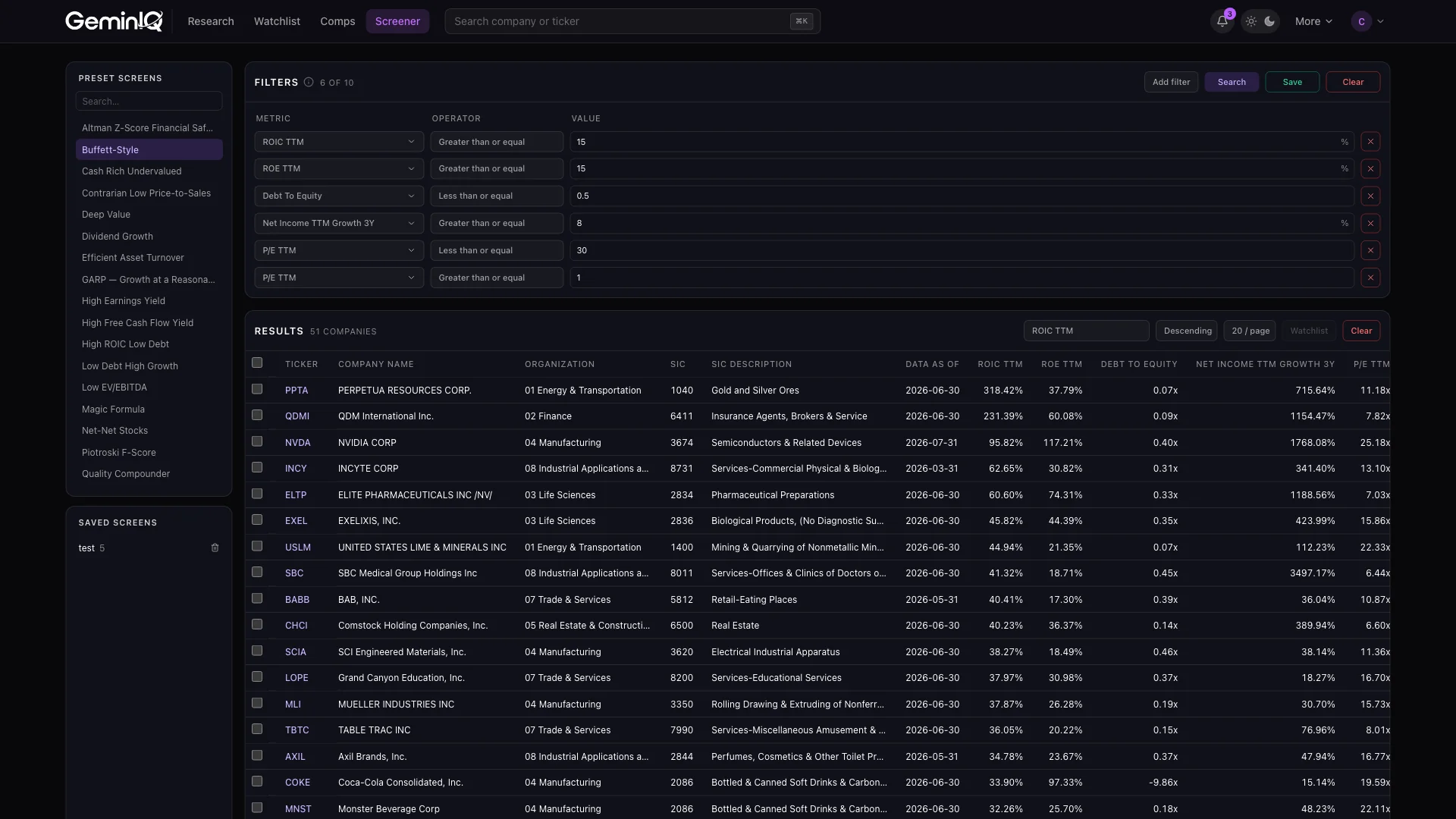
Launch instantly from 18 pre-built strategies modeled on proven frameworks, from Benjamin Graham's Net-Net formula to Joel Greenblatt's Magic Formula. Save any filter combination for reuse, sort results by any metric you screened on, and add companies to a watchlist a full page at a time.
- Altman Z-Score Financial Safety Screener — flags companies at elevated risk of financial distress
- Buffett-Style Stock Screener — quality businesses with durable moats and consistent returns on capital
- Cash Rich Undervalued Screener — strong cash positions trading at a discount to intrinsic value
- Contrarian Low Price-to-Sales Screener — out-of-favor names trading at depressed sales multiples
- Deep Value Screener — classic Graham-style value criteria across price and balance sheet ratios
- Dividend Growth Screener — consistent, growing dividend payers
- Efficient Asset Turnover Screener — companies generating the most revenue per dollar of assets
- GARP Screener — Growth at a Reasonable Price
- High Earnings Yield Screener — the cheapest stocks on an earnings-to-price basis
- High Free Cash Flow Yield Screener — companies generating the most free cash relative to their price
- High ROIC Low Debt Screener — efficient capital allocators with conservative balance sheets
- Low Debt High Growth Screener — growth without the leverage risk
- Low EV/EBITDA Screener — the cheapest names on an enterprise-value basis
- Magic Formula Stocks — Joel Greenblatt's ranking system combining earnings yield and ROIC
- Net-Net Stocks — Benjamin Graham's formula for stocks trading below net current asset value
- Piotroski F-Score Screener — the 9-point fundamental strength checklist popularized by Joseph Piotroski
- Quality Compounder Screener — durable, high-return businesses built to compound over time
- Shareholder Yield Screener — combines dividends, buybacks, and debt paydown into one capital-return metric
See the defense sector analysis that starts where a screener result ends: The GeminIQ Intel Brief: Finding the Signal in the Defense Sector.
Comparable company analysis
Comps: A Dedicated Peer Analysis Workspace
Comparable company analysis has its own home. Comps is a dedicated stock comparison tool for benchmarking a company against its peers: start from a subject company and add peers one at a time, each with its own selectable filing period. Sets are saved and named, and metric layouts save separately to reapply to any future group.
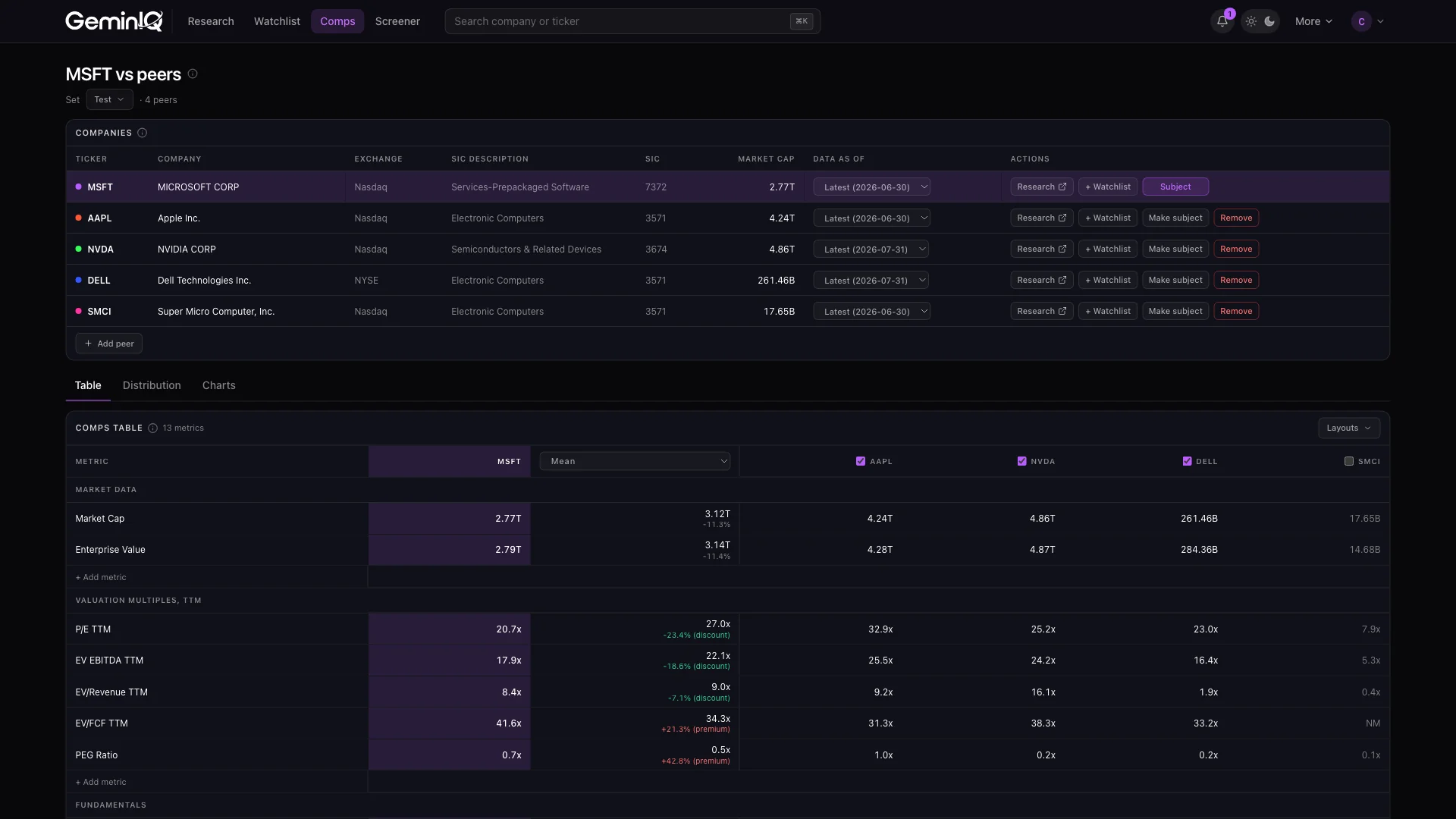
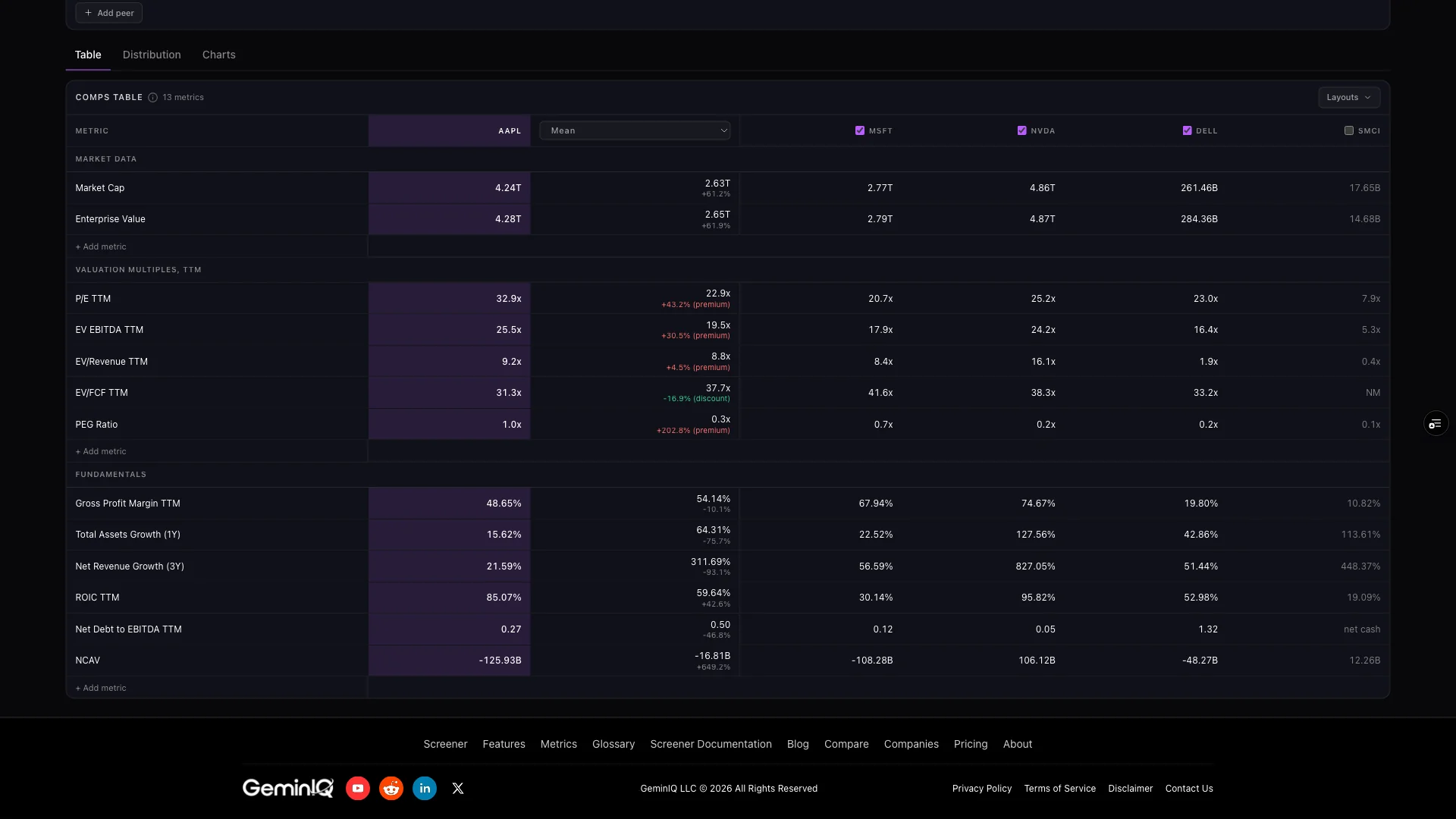
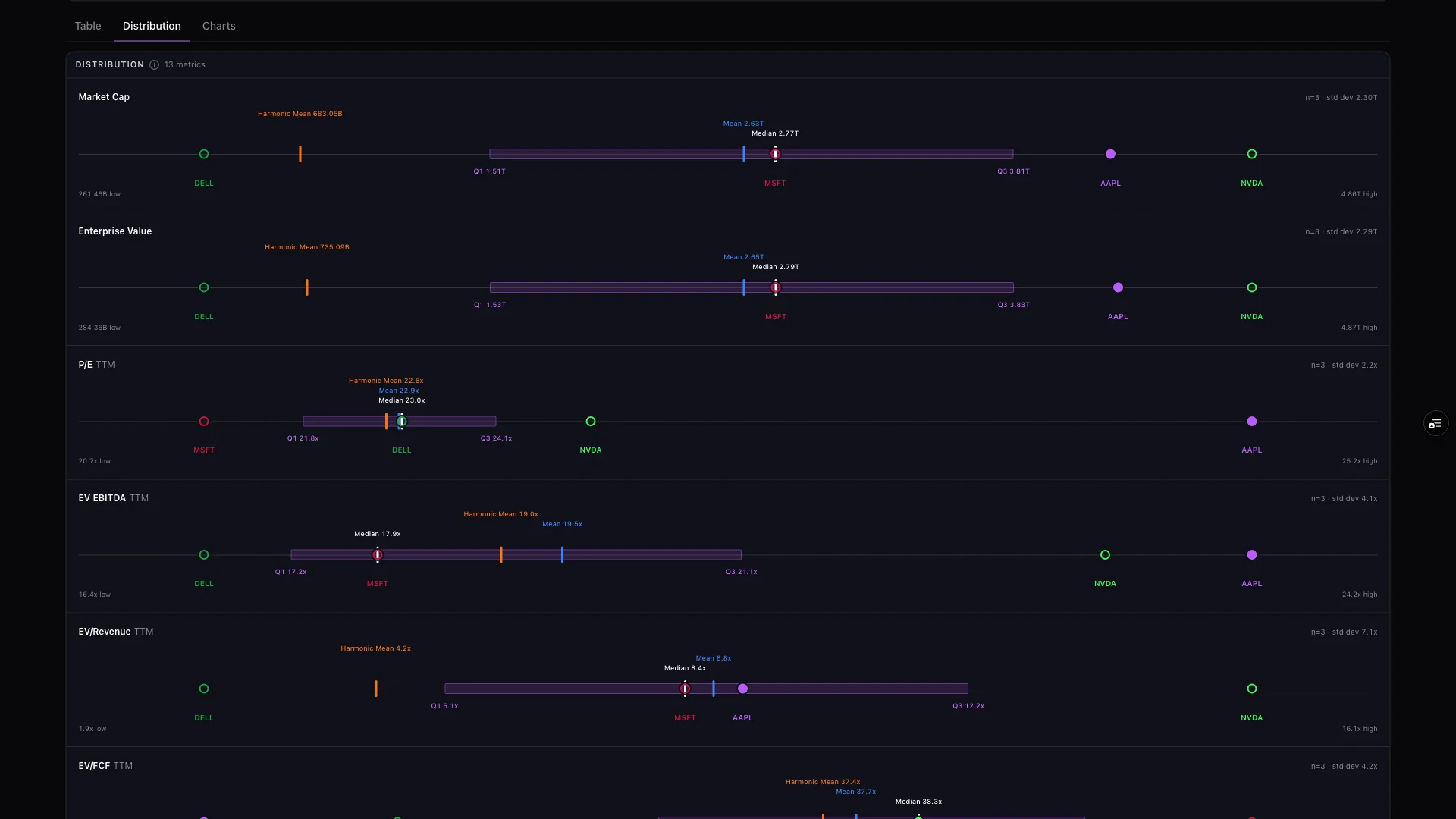
Three views handle the actual comps analysis. The table puts every company side by side with the subject frozen and a statistic column you choose — Median, Mean or Harmonic Mean — plus a premium/discount readout on every row, and any peer can be excluded from the statistic without leaving the table. The distribution view plots each metric as a full peer range with an interquartile box, mean and median markers and per-company dots. Charts renders every metric as a small-multiple time series with all peers together.
For valuation multiples, each distribution ends with a plain sentence rather than another chart: the peer 25th–75th percentile range applied to the subject’s own EBITDA or earnings, the enterprise value or market cap that implies, and whether the actual figure sits above, below or inside it.
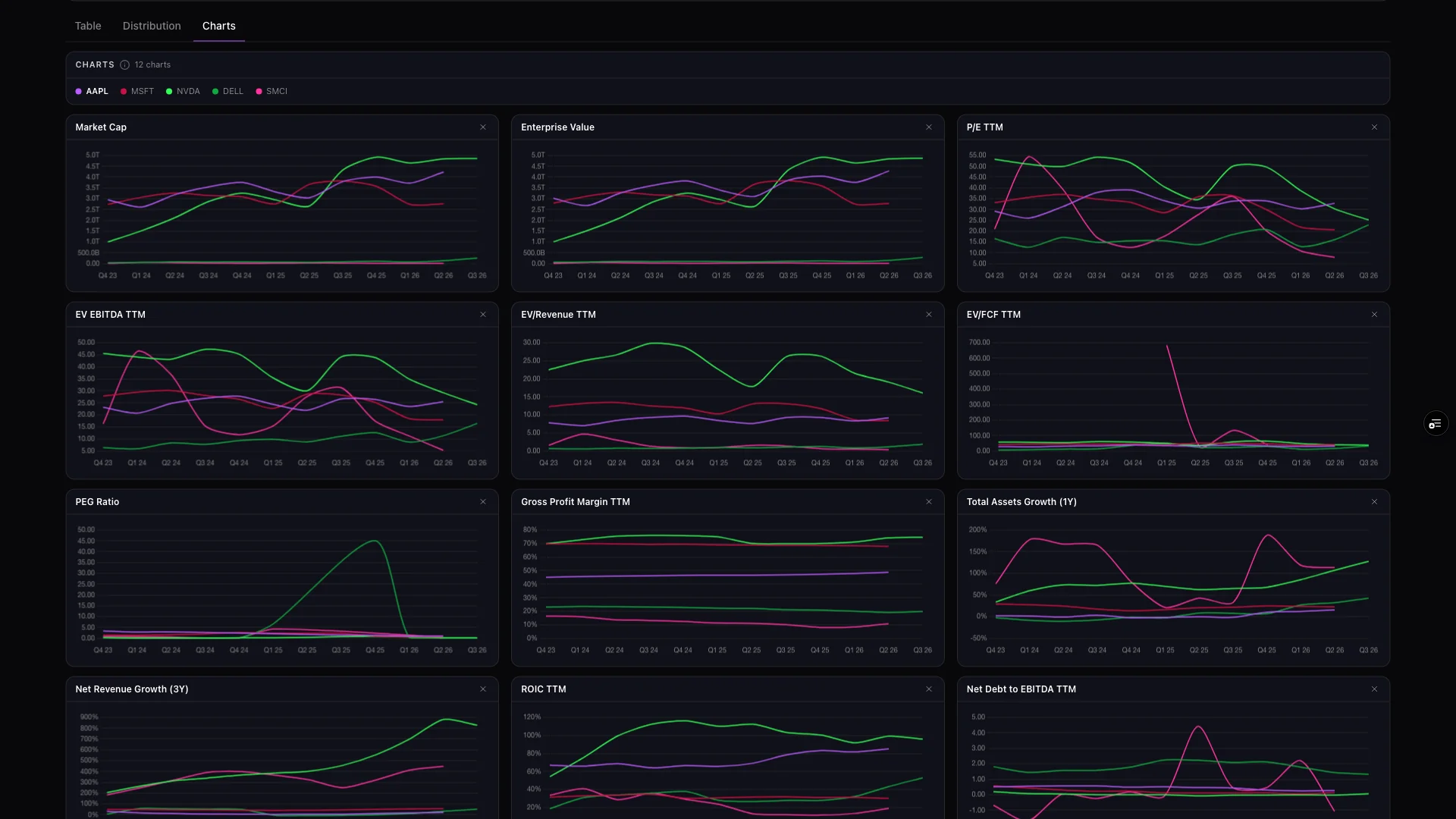
See peer benchmarking used to rank three defense contractors that look identical on paper: The GeminIQ Intel Brief: Finding the Signal in the Defense Sector.
Price targets, theses & alerts
Watchlists: From Ticker List to Live Investment Thesis
A stock watchlist isn’t just a list of tickers you’re keeping an eye on — it’s a record of why you’re watching them and what would change your mind. Track your positions in Core, Monitoring or Speculative buckets across as many named lists as you run, with any metric or line item addable as a column.
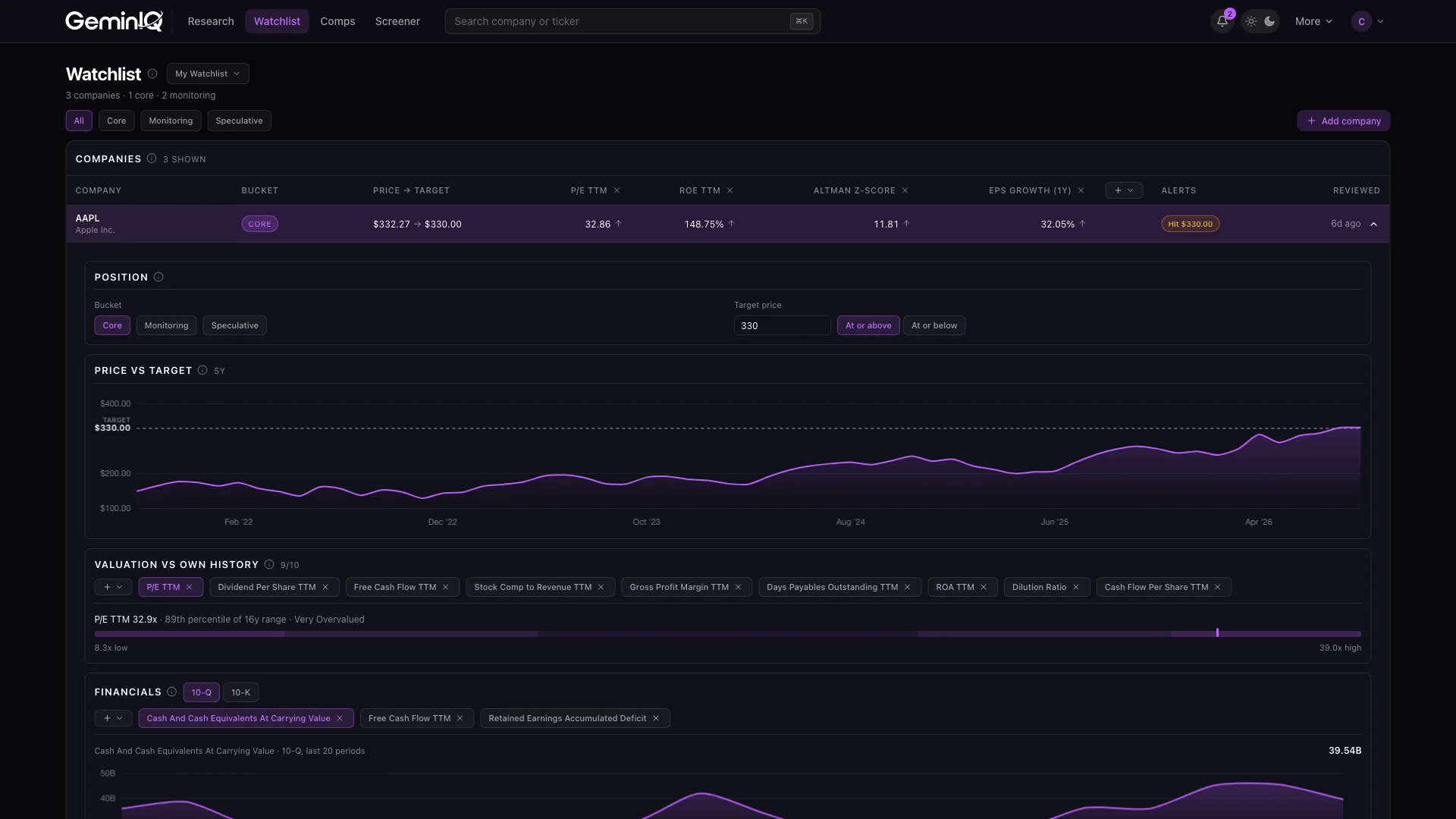
Set a price target and direction on every position and watch the live spread against it, record your investment thesis, price target rationale and kill criteria in a dedicated field, and configure built-in stock alerts for a price hitting your target, a move over 15% in a week, or a new 10-K or 10-Q filed in the last two weeks — surfaced as table badges and through a notification bell that evaluates every list at once.
Expand any row for a valuation percentile measured against that company’s own history ("87th percentile of 16y range"), a searchable chart of any metric on that company, and compact insider, institutional and price summaries scoped to the position.
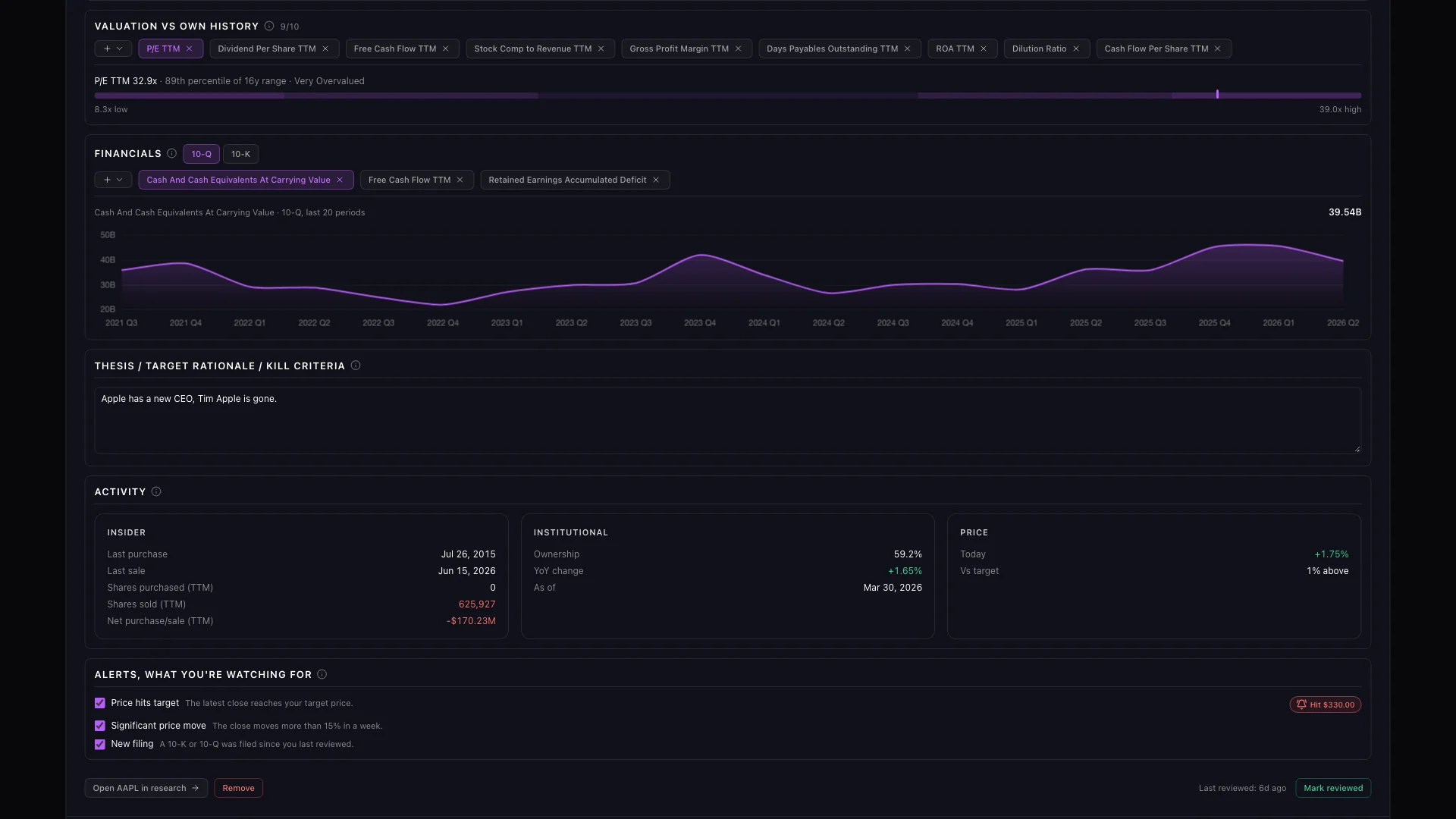
See the peer workflow used to rank three defense contractors that look identical on paper: The GeminIQ Intel Brief: Finding the Signal in the Defense Sector.
7-day free trial
Let's get started.
Try GeminIQ free for 7 days — every feature on this page, on real filings, with full access to all data.
Start your free trialNo card required to browse 3 years of data free.